Problem and Objective:
NC State University’s Department of Campus Planning and Facilities Management has asked a GIS Analyst to develop a geodatabase that can be used for future planning and management of campus buildings and extension facilities. As the final deliverable, the objective of this assignment is to create a geodatabase that only includes six feature classes: streets, sidewalks, streams, lakes, buildings, and athletic fields that are properly georeferenced to a NAD 1983 state plane coordinate system. The facilities department would like to have a .gdb including certain layers from the campus master plan provided in a CAD dwg file.
Analysis Procedures
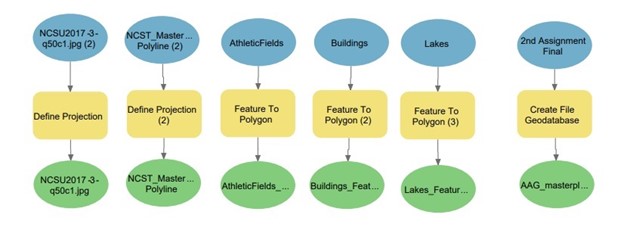
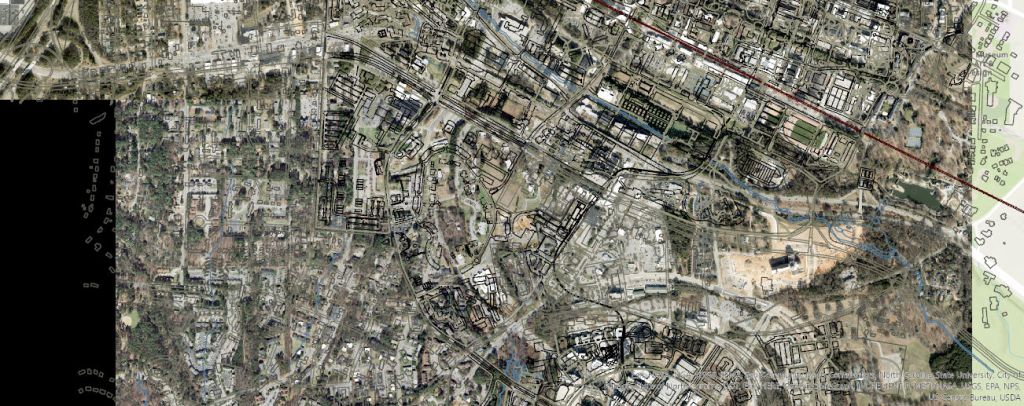
To develop this geodatabase, I used ArcPro and several analysis tools such as Define Projection and Georeferencing to integrate the AutoCAD data. The data used for this assignment is a 1ft cell size raster image (.jpg) that will be used as reference data; and an AutoCAD dataset that consists of points, polygons, polylines, annotation, and a multipatch (.dwg file) provided by NC State University. AutoCAD datasets can be georeferenced by using orthophoto imagery to determine the projection. After adding the orthophoto, I used the Define Projection tool to designate NAD 1983 NSRS 2007 feet as the state plane coordinate system. After georeferencing the CAD drawing file, I identified the NCST_Masterplan05_PolylineGroup feature data class as the CAD feature class that would have all of the features I needed for the final file geodatabase. I used the Define Projection to ensure that when converting CAD file to Geodatabase files, the correct projection would be defined and so that the photo would align. First, I used the CAD to Geodatabase tool to convert the files; however, when checking the properties of the files, the geometry for Athletic Fields, Lakes, and Buildings were designated as lines. For these three feature classes, I then used the Feature to Polygon Tool. These feature classes were then used to create a world file. Finally, I exported all six feature classes to the File Geodatabase.
Workflow diagram:
Results:
Application and Reflection:
After completing this assignment, georeferencing CAD data is useful when it comes to reviewing planning documents and determining future building projects. This assignment helped me learn that the purpose of georeferencing CAD data is to overlay it with existing spatial data as accurately as possible without skewing the geometry. Georeferencing CAD data can be used for numerous things. One example where georeferencing can be useful for predicting renovations or add-ons to a hospital. If Wake Med on New Bern Ave wants to add/build a clinic or extra surgery rooms to the already existing structure(s), GIS analysts would need to georeferenced the original CAD drawings from the 1970s.
Problem Description: Based on Raleigh’s increase in population, WakeMed Hospital has decided that it would like to expand the hospital by building two extra surgery rooms. Wake County in partnership with WakeMed has asked that a gis analyst assess whether or not the hospital can expand and if so, where?
Data Needed: Original 1970s CAD drawings of WakeMed Hospital, Wake County Roads
Analysis Procedures: GIS analysts would use a current vector image of WakeMed Hospital and georeference the 1970s CAD drawings and current CAD drawings to the image to determine possible locations for new buildings or locate buildings that can be expanded on. It is important to define the projection of the 1970s CAD drawings to align with the current image of WakeMed Hospital because the City of Raleigh has changed in terms of growth in comparison to the 1970s.
 MY GIS 520 PORTFOLIO